 WorkKit Downloader by WorkKit
Give it a link
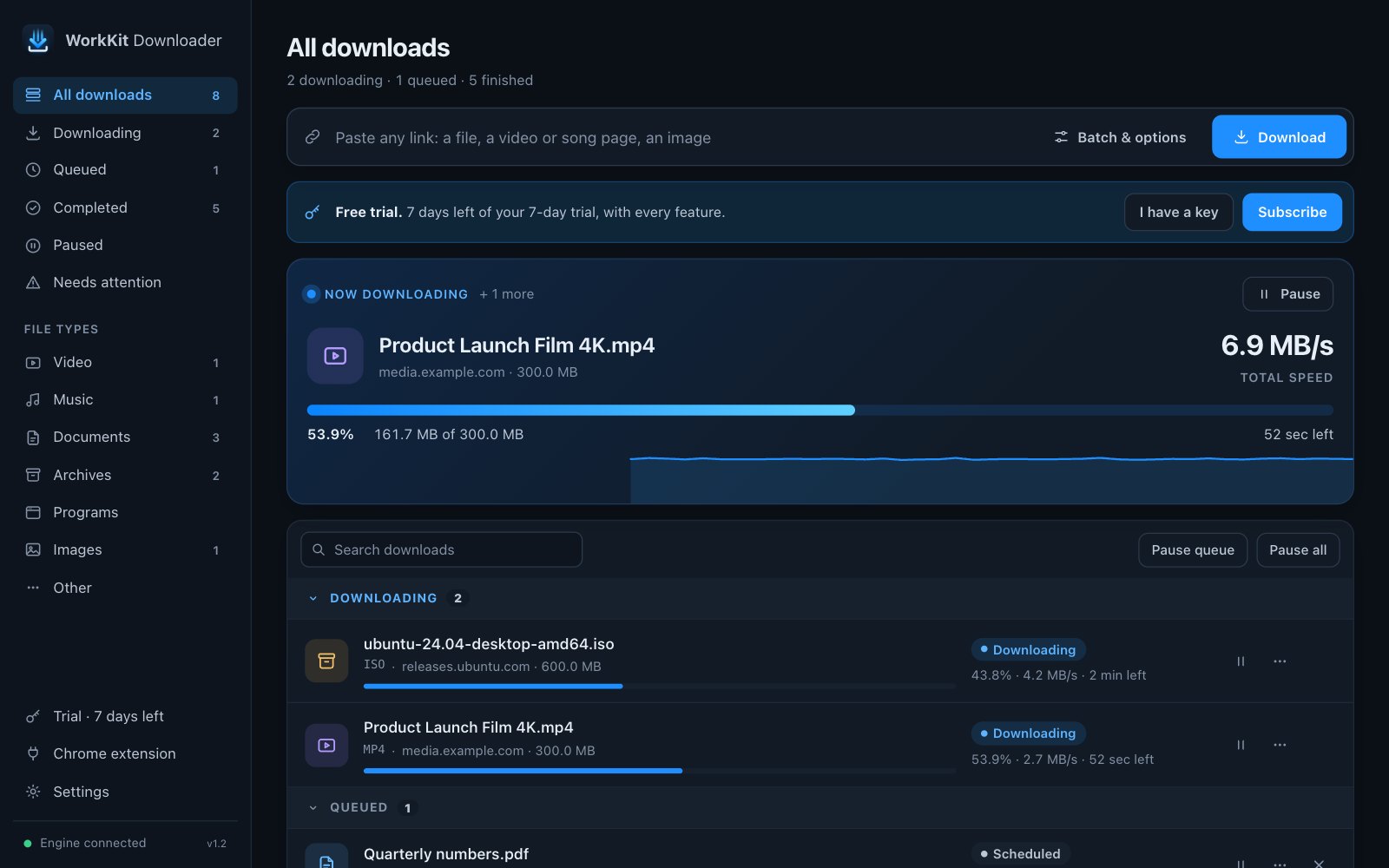
Paste anything into Add download: a file, a video page, a song, an image. Or right-click it in Chrome. Paste 200 at once if you like.
Download manager · Mac, Windows & Linux
One download manager for everything you save. Big files arrive faster over parallel connections and pick up where they stopped if your Wi-Fi drops. Videos and music from YouTube, SoundCloud and over a thousand other sites come down in the quality you choose. Images go straight from the page to your folder.
For Mac (Apple silicon, macOS 12+), Windows 10 and 11, and Linux. No account, no card to start.

How it works
Paste anything into Add download: a file, a video page, a song, an image. Or right-click it in Chrome. Paste 200 at once if you like.
See the real choices the site offers, from 144p to 4K, or Audio only, with the file size before you start.
It downloads in the background, checks every file is complete, and sorts the list into Video, Music, Images, Documents, Archives and Programs.
Why it beats your browser's downloads
Apps, ISOs, archives, documents, datasets. Split into up to 16 parts that download side by side when the server allows it, with up to 8 downloads at once.
From YouTube and over a thousand sites, plus the HLS and DASH streams behind most players. Choose 144p to 4K and see the size first. Saved as MP4 that plays everywhere.
Save songs and podcasts from SoundCloud and other sites, or just the sound of any video. M4A or MP3 that plays on phones, Macs and Windows.
Right-click any image in Chrome and send it over, or paste image links in a batch. They land in their own Images list.
Pause, close the laptop, lose Wi-Fi: it carries on from where it stopped. If the file changed on the server it starts clean, never saving a broken mix.
Queue downloads for later, set a start time, cap the speed so calls stay smooth, and get a SHA-256 checksum for every finished file.
Pricing
Every feature from the first launch, with no sign-up and no card. When the 7 days are up, new downloads need a plan; everything you already saved stays yours.
The full app on Mac, Windows or Linux. Nothing to cancel.
A license key for one month. Pay again only when you want another.
About ₹83 a month: 44% less than paying monthly.
abhi24395@okaxisYour app will show the account holder's name.Nothing is charged automatically and there is nothing to cancel. A few days before your key runs out, the app reminds you. Renew if you want to; if you don't, your downloads stay exactly where they are.
UPI works from India. Paying from abroad, or a question about a payment? Write to support@workkit.in.
Download · version 1.2.1
One app for Mac, Windows and Linux. Add the browser extension if you want to send links and videos straight from Chrome.
macOS 12 Monterey or later · Apple silicon (M1 or newer)
Download .dmg 55 MBFirst launch: the one-time Open Anyway step.
Windows 10 or 11 · 64-bit
Download installer 43 MBIf SmartScreen appears: More info › Run anyway.
64-bit (x86_64) · Ubuntu 22.04, Debian 12, Fedora 36 or newer
Download .tar.gz 68 MBUnpack and run. Three commands.
Chrome, Edge or Brave, on any of the three · optional
Download .zip 33 KBNot in the Chrome Web Store yet: load it in a minute.
SHA-256 checksums of the release files, to confirm a download is genuine. On Mac or Linux run shasum -a 256 on the file; on Windows, Get-FileHash in PowerShell.
f0d050325424cc2fedaddffe8dca3907311f8f9f6aa901270950a6f1d7b6fce5 WorkKitDownloader-1.2.1.dmge12ec988aeca6da88d0acf927b1dded428e19d82b989d4710e2872d5841721ec WorkKitDownloader-Setup.exef1b2119c4fc277fb70500831193c801124dc1c19d1c7e337d147de2c170aa03a WorkKitDownloader-windows.zipf764a7c03e8c0a5f4487ad23eeb5acef638f4a9ef8fc0f5f4d85d57e2e22fee0 WorkKitDownloader-linux-x86_64-1.2.1.tar.gzd07aeda5b40a7a8b0d07cb4efcc762b3cb3c13133cfb2bd1c66147e3ce593ccd WorkKitDownloader-Chrome-extension-1.2.1.zipInstall guide · the one-time security notice
WorkKit signs the app with its own certificate instead of Apple's and Microsoft's paid ones, so the first time you open it your computer asks whether you trust it. Nothing is wrong with the file, and you can check it against the published checksum.
Apple could not verify “WorkKit Downloader” is free of malware that may harm your Mac or compromise your privacy.
xattr -dr com.apple.quarantine "/Applications/WorkKit Downloader.app"Microsoft Defender SmartScreen prevented an unrecognised app from starting. Running this app might put your PC at risk.
More infoApp: WorkKitDownloader-Setup.exe
Publisher: Unknown publisher
WorkKitDownloader-Setup.exe. If the blue screen appears, click the small More info link.Antivirus held the file? Some scanners pause installers they haven't seen before. Restore it, compare the checksum, and allow it.
tar -xzf ~/Downloads/WorkKitDownloader-linux-x86_64-1.2.1.tar.gz -C ~
cd ~/"WorkKit Downloader" && ./install-menu-entry.sh
./"WorkKit Downloader"Needs a desktop session (X11 or Wayland with XWayland). No root, nothing installed outside your home folder.
chrome://extensions and switch on Developer mode (top right).Chrome may remind you now and then that a developer-mode extension is installed; that's normal for extensions loaded this way. Edge and Brave should work the same way; Chrome is the browser it's tested with.
Privacy
Your downloads go straight from the website to your computer. Here is everything the app and the extension touch.
| What | What happens |
|---|---|
| Your downloads | Come straight from the website to your computer. WorkKit never sees the links, the files or your history; the list lives only on your computer. |
| The dashboard | Served by the app itself at 127.0.0.1, so it only works on your own computer. Websites can't talk to it. |
| Sign in to sites (off by default) | If you turn it on, the app reads the chosen browser's sign-in cookies on your computer, only while fetching a video, and sends each cookie only to the site it belongs to. It never stores or uploads them. |
| The browser extension | Looks at the network requests of the tab you're on only to spot videos, and sends the links you choose to the app. It never copies cookies, passwords or sign-in headers. |
| Your license key | Checked on your computer with a digital signature. Nothing is sent anywhere, so it works offline too. |
| The 7-day trial | A small file on your computer remembers when the trial started. Nothing is sent anywhere. |
| Payment | Your UPI app talks to your bank. WorkKit only receives the email you send with your reference number. |
| Analytics and updates | None. The app doesn't track how you use it and doesn't check for updates yet; new versions are announced on this page. |
Questions
YouTube (video in every quality, or audio only) and SoundCloud are tested with every release. The built-in open-source yt-dlp engine knows over a thousand more, including Instagram, Facebook, X, Vimeo and Reddit; some of them only show videos to signed-in visitors, so turn on Settings › Sign in to sites for those. DRM-protected streaming services don't work.
Yes. Right-click any image in Chrome and choose Download with WorkKit Downloader, or paste image links into Add download (one per line for a batch). Photo-only posts on social sites aren't supported yet; from those it saves videos.
Yes. Every video has an Audio only choice, and music sites like SoundCloud give you audio directly. It's saved as M4A (or MP3 when the site sends MP3), which plays on phones, Macs and Windows.
It depends on the video and where you live. YouTube's terms restrict downloading, so save what you have the right to keep: your own uploads, Creative Commons videos, or videos whose creator allows it. You are responsible for what you download.
New downloads, resumes and video checks stop until you paste a license key. Everything you already downloaded stays in its folder, and your download list stays in the app.
Yes. The key isn't tied to an operating system. Please use it for your own computers.
Apple and Microsoft show a warning for apps not signed with their paid developer programs. WorkKit signs the app with its own certificate instead. Follow the install guide once and it opens normally after that.
Sites change how they serve video every few weeks. Email support@workkit.in with the site (not the file) and what you saw; updates of the app bring a fresh copy of the video engine.
Not yet. The Mac version needs Apple silicon (M1 or newer) and macOS 12 Monterey or later.
No. You can paste links into the app's Add download window. The extension adds right-click sending, catching Chrome's own downloads, and the button on videos.
Pay again by UPI and email the new reference number. If you renew early, say so in the email and your new key starts when the old one ends.